 Campound
Find a spot
Help guide · Updated June 25, 2026
Open the panel
Tap the calendar-with-search icon in the toolbar at the top of the map.
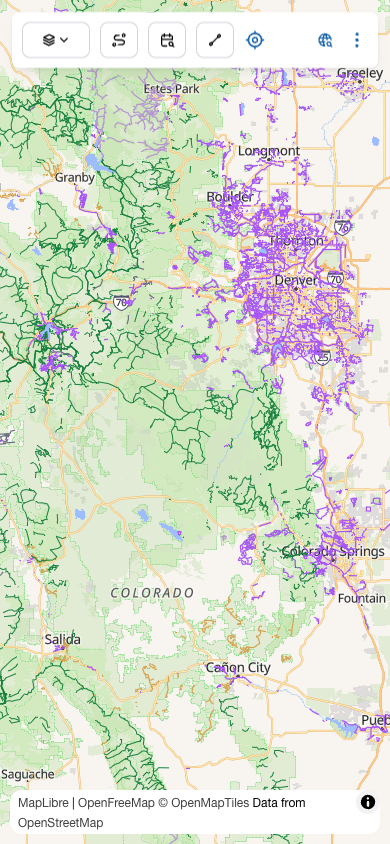
A panel slides up from the bottom with everything you need.
Pick your dates
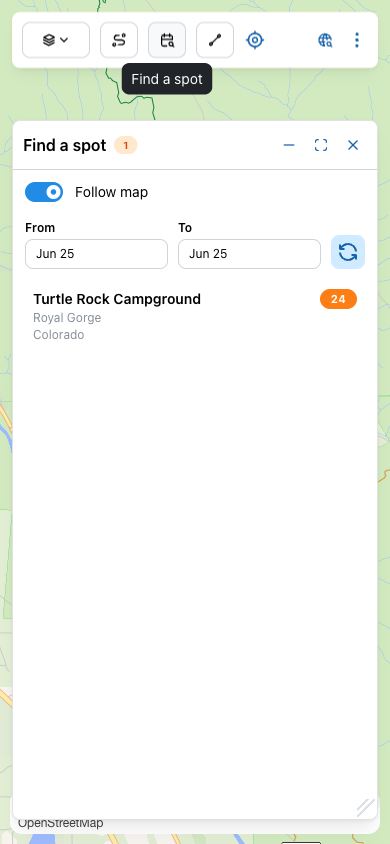
The From and To pickers govern which sites the panel checks for availability. The default is today → today, which is enough for a last-minute spot tonight. Widen the range when you're planning ahead — a four-day trip needs four nights of overlap.
The count badge next to the title (1 in the screenshot above) is how many facilities matched the viewport — not how many available sites. To check actual availability you'll open a facility and look at the campsite list.
Pan around to find facilities
The list shows campgrounds in the current map viewport.
- Follow map (the blue toggle) — auto-refreshes the list as you pan and zoom.
- Refresh (the large light-blue button) — manual re-query, useful when Follow map is off or when reservation data may have changed.
Each row shows the facility name, parent area (e.g. Royal Gorge), state, and a count of campsites in that facility.
Open a facility
Tap any row to open the facility detail.
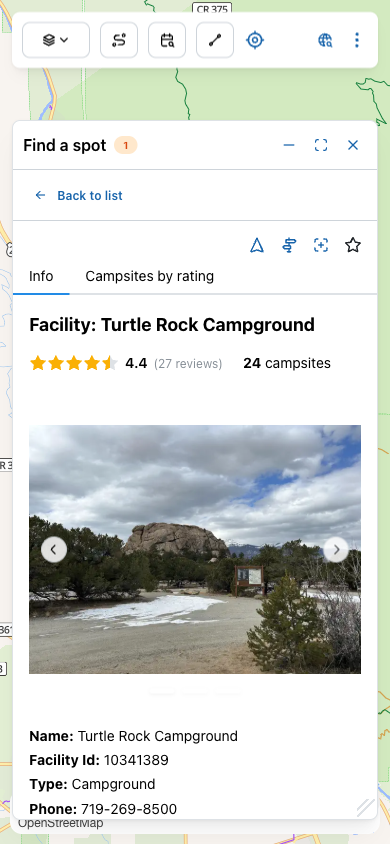
You'll get, depending on what Recreation.gov has on file:
- Photo carousel — swipe through real photos of the campground.
- Aggregate rating — average user star rating + review count.
- Total campsite count — the orange badge by the rating.
- Info tab — name, facility ID, type, phone, email, full description, recreation activities, facilities offered, natural features, and nearby attractions.
- Campsites by rating tab — see next section.
The action row
Four icons sit at the top right.
Navigate
Starts turn-by-turn navigation to the campground entrance. Auto-minimizes the panel so the map is in view. From the individual-campsite screen it navigates to the site itself instead of the entrance.
Directions
Opens driving directions in Apple Maps — the iOS Maps app on iPhone, or maps.apple.com in a browser. Useful when you want the standard car-nav experience.
Show on map
Recenters and zooms the map to the campground, drops a labeled pin, and minimizes the panel so you can see the surroundings.
Favorite
Saves the campground (or individual campsite) to your favorites with a 1-to-5 star rating. Tap the star, pick a rating to commit. Once favorited the star fills yellow; a Remove favorite option appears in the popover.
Find the best-rated open sites
The Campsites by rating tab is where Find a spot earns its keep — it surfaces only the sites that have user reviews, so you skip the unscored campsites the algorithm doesn't know much about.
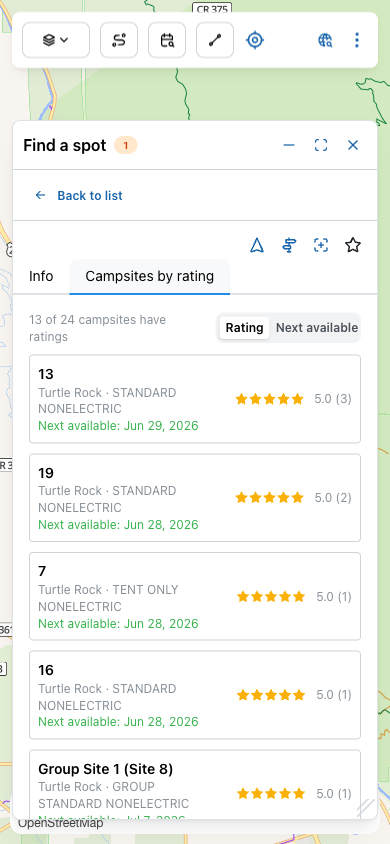
Each row shows:
- Campsite number (the in-park label, e.g.
13), loop, and type (Standard Nonelectric, Tent Only, Group, etc.). - Star rating with the number of reviews in parentheses.
- Next available date in green — the soonest date the site can be booked, given your From date.
The sort toggle at the top right switches between:
- Rating — highest-rated first. Use when you have flexible dates and want quality.
- Next available — soonest open date first. Use when you need somewhere tonight.
Tap a campsite
Tap any row to dive into a single site.
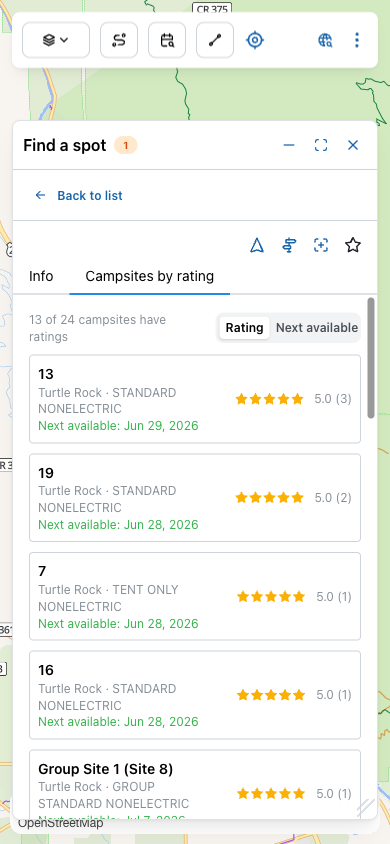
Four tabs at the top:
- Info — name, loop, type, latitude/longitude, and other site-level metadata.
- Ratings — individual user reviews.
- Reservations — the availability calendar (see below).
- Facility — jump back to the parent facility's detail.
The reservations calendar
The Reservations tab is a month-grid showing the booking status of every day for this specific site.
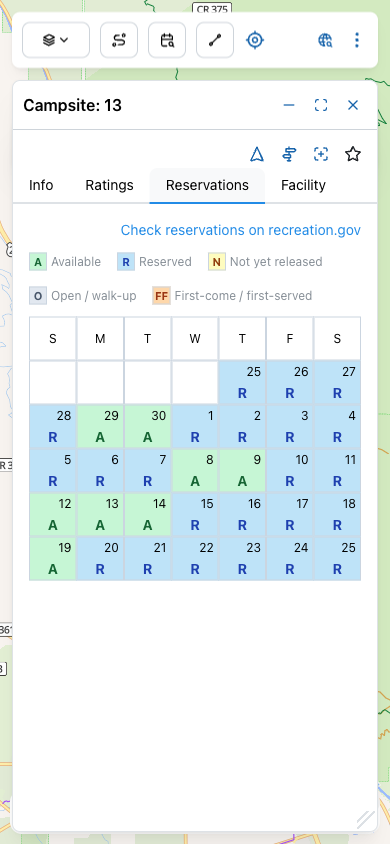
What the codes actually mean:
- A — Available: bookable right now. Tap Check reservations on recreation.gov to actually book.
- R — Reserved: someone already has it.
- N — Not yet released: Recreation.gov hasn't opened the booking window yet — most campgrounds release on a rolling 6-month schedule.
- O — Open / walk-up: not on the reservation system; first-come, first-served at the campground.
- FF — First-come / first-served: same idea — show up and grab the site if it's empty.
Campound doesn't process bookings — the Check reservations on recreation.gov link at the top of the calendar opens the site's listing on Recreation.gov in your browser, where you complete the reservation.
Get out of the way
The panel header has three sizing controls — same as the rest of Campound.
- Minimize — collapse to a thin header pill. Your selection is preserved.
- Maximize — go full-screen for browsing long campsite lists.
- Close — dismiss the panel entirely.